Construction Project Scheduling Redefined
Focused, intuitive and cost effective project scheduling for the modern age of construction.
Phoenix Project Manager is a scheduling tool designed to work the way the construction industry works: project by project. For every project, from the very simple to the most complex, Phoenix gives you the power to make the schedule a valuable tool for managing the job. Phoenix allows you to take advantage of your existing scheduling experience, by combining sophisticated scheduling tools with a familiar, intuitive interface.
The premier Critical Path Method (CPM) scheduling software for Windows and MacOS
Phoenix Project Manager was developed as easy-to-use CPM scheduling software that is built on a simple concept of "two clicks to complete". Phoenix has redefined how schedules are developed and is more user-friendly than Microsoft Project™, P3, and SureTrak. Phoenix provides the robust scheduling discipline required on today's most complex construction projects.
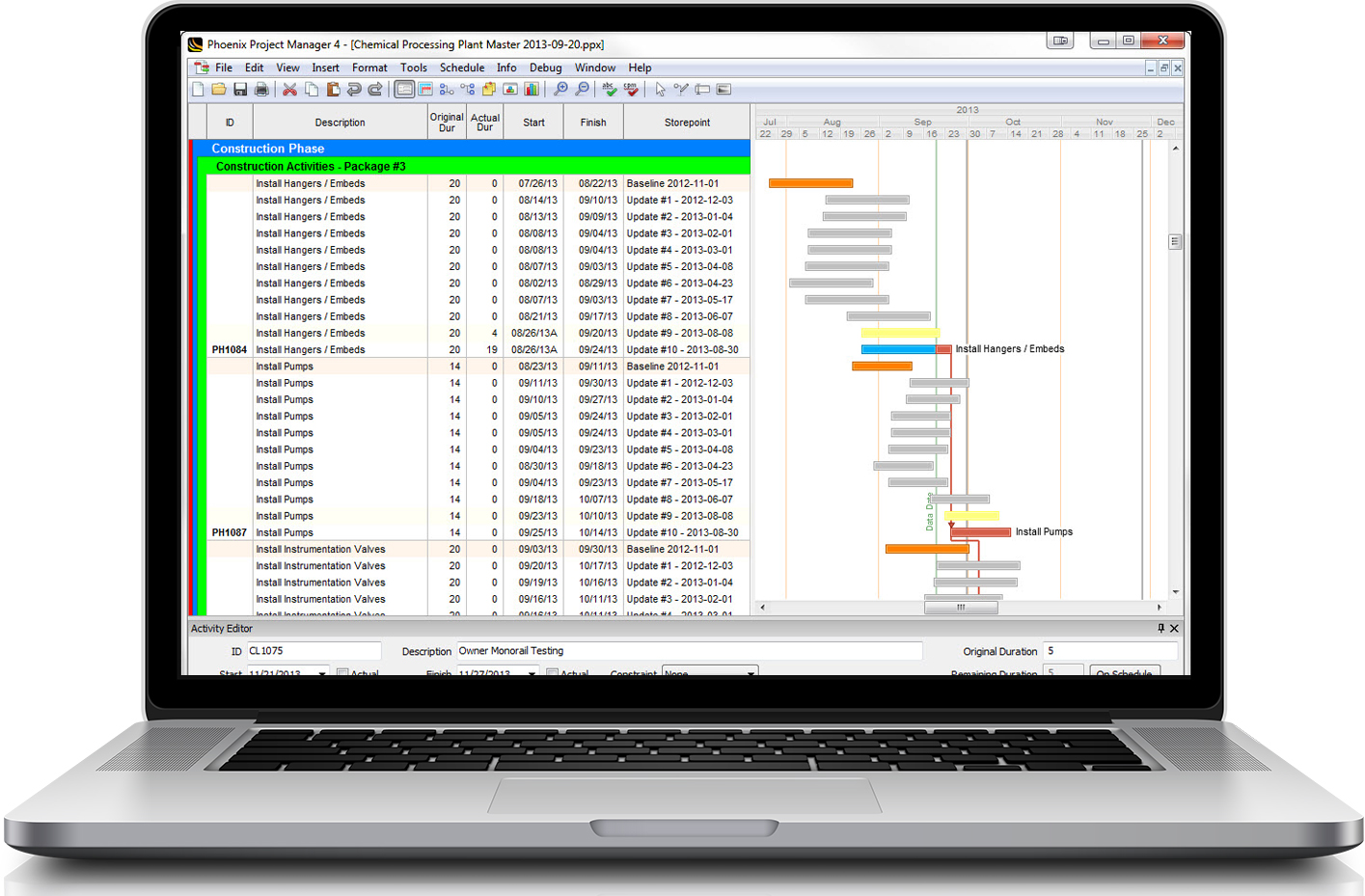
The built-in CPM Checker ensures the quality of the schedule, and the storepoint comparisons demonstrate how the project has progressed over time. Understanding schedule quality is easy with Phoenix Project Manager Scheduling Software.
Phoenix Project Manager supports the existing established schedule standards for reporting, schedule discipline and data exchange including Primavera P3, P6 and Microsoft Project 2003 and 2007 formats.

Free Trial of Phoenix Project Manager
Complete this form for instant access to download Phoenix Project Manager scheduling software.
Phoenix Project Manager: focused on projects and delivering them early
Phoenix Project Manager is a CPM Scheduling tool built by professional schedulers to manage the tasks and resources required to complete projects on-time and on-budget. Phoenix helps to ensure the quality of the project plans with a built in "CPM Checker," finding problems before they impact the project.
Simplified planning & scheduling
Reduce your complex project to an easy-to-understand diagram, consumable by all project stakeholders.
Understand your schedule at a glance
Easily see if you were ahead, behind or on schedule for the owner, subcontractors and everyone in between.
Familiar, intuitive interface
An interface you know with simplified work processes for less training, and lower transition costs.
Timescaled network diagram
Consolidate your activities into a logical work stream and simplify your project management process.
Realtime Status
See the status of every activity today, and how that will affect the project months from now.
Import / Export to popular formats
Oracle Primavera P3, P6 & Suretrak, Microsoft Excel, Microsoft Project and USACE SDEF.
Phoenix Project Manager supports the SDEF file format The Standard Data Exchange Format (SDEF) provides a proprietary protocol to exchange project planning and progress data between scheduling systems and project management software. It is used by the United States Army Corps of Engineers in their project management and network analysis systems (NAS).
The REAL ALTERNATIVE for construction scheduling.
While the Phoenix scheduling software interface is familiar, with many of the same features your existing software provides, complex functions have been simplified in order to make common tasks less time consuming with better results.
- Status-on-Master view.
Gain increased insight into the status of your project - Timescaled Network Diagram
Communicate your schedule more effectively - Lag-To and Unlimited Comparisons
Increase your accuracy and productivity
- Critical Path Method Scheduling Algorithm
- Calculate Critical Path by Total Float or Longest Path
- Support for Tasks, Milestones, Flags, Hammocks (Summary Activities)
- Finish-to-Start, Start-to-Start, Finish-to-Finish, and Start-to-Finish Relationships
- Retained Logic Relationships
- Early Start, Finish; Late Start, Finish; Must Start, Finish Constraints
- Calculate and Display Original Duration, Remaining Duration, Free Float, Total Float, Percent Complete, Early Start, Early Finish, Late Start, Late Finish, Actual Start, Actual Finish, Estimated Start, Estimated Finish
- Create storepoints to track revisions/updates of a schedule, and create quick comparisons to identify variance
- Support for scheduling with Multiple Calendars
- Default 5 Day, 6 Day, 7 Day Calendar
- Support for custom calendars, holidays, recurring non-works, exceptions
- Unlimited Activity Codes and Values for Organization
- Define Colors/Fonts for Activity Codes
- Enable/Disable Organization by Code and add new Values via Activity Code Toolbar
- Sort by Start Date, Finish Date, Activity ID, or Description
- Track fixed costs per activity with the Cost Account System
- Define and Assign Resources to Tasks with Resource Costs
- Resource Allocation Graphs to identify over/under Allocations and Usage
- Save Multiple Layouts in a Project File, Load, Create, Copy via Layout Management
- Complete filter system, create custom filters and combine multiple filters in a view
- Customize Columns Visible, Row Height, Sightlines, Bars, Date Formats
- Save comparisons and storepoint views
- View your project as a time-scaled network diagram to plot a complex project on a single printout
- Compress your schedule vertically, and arrange tasks in logical groupings by assigning multiple tasks to a line
- Update mode highlights activities that fall between existing and proposed data date
- Update On-Schedule for All Activities or Selected
- Cancel update to roll-back changes
- View projected project completion with Status-on-Current
- View status against your plan with Status-on-Master view
- Import from Suretrak and P3 Project Groups
- Import and Export to Project MPX and XML
- Import and Export to P6 XER Files
- Import and Export to XLS & XLSX
- Import and Export to Microsoft Excel
- Import and Export to CSV
- Export to U.S. Army Corps of Engineers SDEF format
See Phoenix in Action
Schedule a demo